Log effortlessly
Say what you spent, write a note, or let an automation do it when you pay. No long forms.
Personal finance app for iPhone
Speak, type, or let Apple Pay log it for you. Cuadre sorts your expenses by category and shows where your money goes, without connecting to your bank.
Free to start · Made in Guayaquil, Ecuador
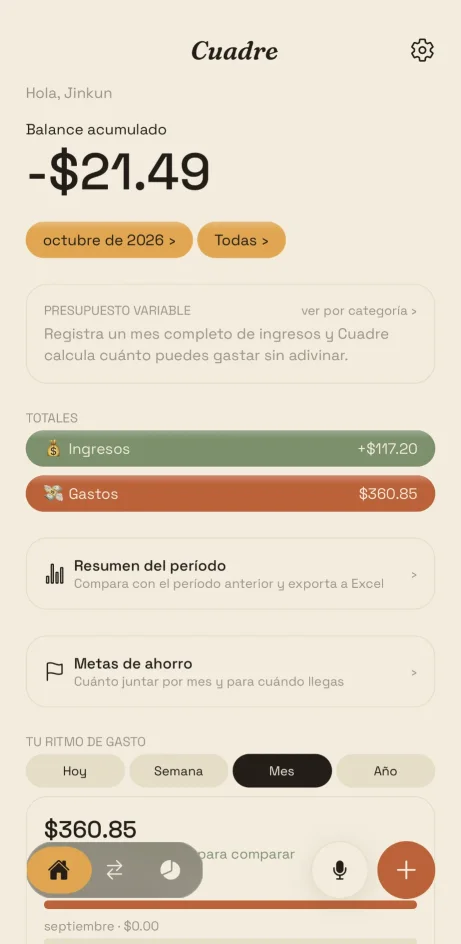
Cuadre is an app to track expenses and income from your iPhone. You log with your voice, by typing, or with Apple Pay and Shortcuts automations; the app suggests the amount, merchant and category, and you confirm. It includes a budget for variable income, savings goals, tags and Excel export. It does not connect to banks and never asks for passwords. Available in English and Spanish.
How it works
Say what you spent, write a note, or let an automation do it when you pay. No long forms.
When logging is easy, you actually do it. Cuadre remembers your merchants and learns which category each one belongs to.
See which categories take the most, compare with the previous period and know how much you can spend before going over.
Features
Every time you pay with your iPhone, a Shortcuts automation notifies Cuadre and the expense is logged with its amount and merchant. No forgetting, no catching up at the end of the month.
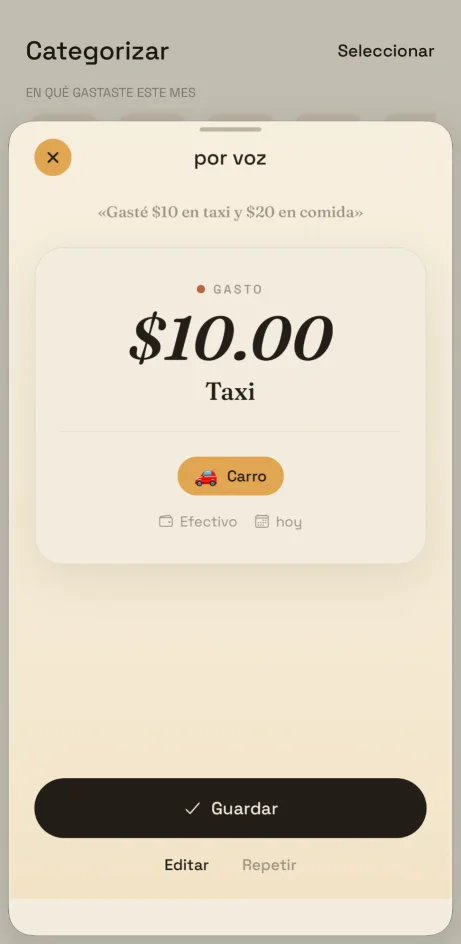
Tap the microphone and tell Cuadre about your day: "I spent ten on a taxi and twenty on food". The app splits each expense, suggests a category and date, and you confirm before saving.
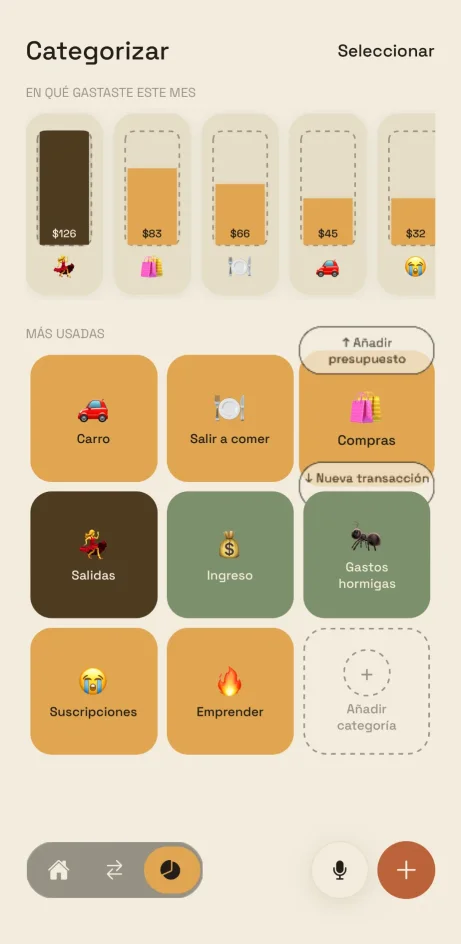
Press and hold a category and swipe: up to add a budget, down to log a transaction. Fast, with one hand.
Ways to log
Automatic logging after every payment with your iPhone.
Say your expense out loud or press the side button and you're done.
Dictate one or several expenses and confirm them on a card.
Amount, category and account, remembering what you used last.
Group expenses from a trip or project with #tags and filter them later.
For your month
If your income changes every month, a fixed budget falls short. Cuadre uses your real income to work out how much you can spend.
Log a full month of income and Cuadre works out your margin without guessing. Then fine-tune by category.
Set how much you want to save and by when; Cuadre tells you how much to set aside each month.
Compare with the previous period, filter by account and date, and export to Excel when you need to.
Your money, your data
You decide what gets logged. Your data is stored separately per user over an encrypted connection, and you can delete your account and data from the app whenever you want.
Frequently asked questions
Cuadre is a personal finance app for iPhone. You can log expenses and income by typing, speaking, or automatically with Apple Pay, Siri and Shortcuts, and it shows you where your money goes by category, account and budget.
No. Cuadre does not connect to banks or ask for usernames or passwords. You decide what gets logged: by hand, by voice, or with an Apple Pay automation. Before saving with voice, you always review the result.
With an Apple Shortcuts automation: every time you pay with Apple Pay, the shortcut notifies Cuadre and the expense is logged with its amount and merchant. The app includes a step-by-step tutorial to set it up. It is a Premium feature.
Yes. Tap the microphone and say, for example: "I spent ten dollars on a taxi and twenty on food". Cuadre understands several expenses in one sentence, suggests the amount, merchant and category, and you confirm before saving. It is a Premium feature.
You can start for free: create accounts and categories, log transactions by hand and use filters. Cuadre Premium unlocks automation (Apple Pay, Siri and Shortcuts, and voice), plus tags, savings goals, period summary and Excel export.
Yes, it was built for that. The variable budget uses what you actually earned to work out how much you can spend, instead of a fixed number that stops working when your month changes. Useful for freelancers, self-employed people and commission earners.
For now Cuadre is available for iPhone. We are working on an Android version.
From the app, in Settings → Delete account. You can also write to soporte@cuadrefinanzas.com. Deleting the account does not automatically cancel your Apple subscription: that is managed in your Apple ID settings.
About
Cuadre is designed and built by JinKun Chen. It came from a real need: keeping track of money when it doesn't arrive the same every month, without endless spreadsheets or guilt. If you have an idea or something doesn't work, write to us: we read every message.
Support
We reply at soporte@cuadrefinanzas.com. You can also write to us from the app, in Settings → Talk to support.
Available on iPhone
Download Cuadre for free and try it before deciding if Premium is for you.
Download on theApp Store